An eye strain headache is usually a mild or moderate ache around the eyes, forehead, or temples that develops during or after prolonged screen use, reading, driving, or other close visual work. It may occur with tired, dry, burning, or watery eyes; temporary blur; difficulty refocusing; and neck or shoulder discomfort. Symptoms often improve after visual rest and a better viewing setup.
Screen timing alone does not prove eye strain. Migraine, dry eye, an outdated prescription, eye-muscle coordination problems, posture, sleep loss, and other conditions can overlap. Sudden vision loss, severe eye pain, a painful red eye, new double vision, sudden extreme headache, weakness, confusion, or trouble speaking needs urgent medical assessment.
Eye strain headache symptoms
Digital eye strain—also called computer vision syndrome—can produce a mix of eye-surface, focusing, head, and musculoskeletal symptoms.
| Symptom group | Common descriptions |
|---|---|
| Head discomfort | Forehead ache, pressure around or behind the eyes, temple headache, mild head heaviness |
| Eye surface | Dry, gritty, burning, itching, watering, redness, tired or heavy eyes |
| Vision | Temporary blur, slow refocusing from near to far, double vision, glare sensitivity |
| Body | Neck, shoulder, upper-back, or jaw discomfort; squinting; difficulty concentrating |
| Functional pattern | Builds during detailed work, improves after a break, returns with another long session |
The combination is more suggestive than headache alone. A severe throbbing headache with nausea and marked light or sound sensitivity may fit migraine better, though migraine can also be triggered or aggravated during visually demanding work.
What causes an eye strain headache?
Eye strain is usually the result of sustained visual effort plus one or more aggravating conditions:
- focusing at one distance for a long period;
- blinking less during concentrated screen work;
- dry air from heating, air conditioning, or a fan;
- glare or reflections;
- very bright or very dim surroundings;
- small text or poor contrast;
- a screen that is too close, high, low, or off-center;
- an uncorrected or outdated vision prescription;
- eye alignment or focusing problems;
- contact-lens dryness;
- poor posture and neck or shoulder tension; and
- fatigue, stress, missed breaks, or long work sessions.
Screens are common contexts, but paper reading, sewing, detailed craft work, microscopy, long-distance driving, and any sustained focusing task can produce similar symptoms.
Why screens can make the eyes feel tired
Two mechanisms are especially practical to understand.
First, people tend to blink less completely and less often while concentrating on a display. The tear film evaporates, which can produce burning, grittiness, watering, and temporary blur. Watery eyes do not rule out dryness; irritation can trigger reflex tearing.
Second, the focusing and eye-alignment systems must maintain near vision for long periods. Small text, close viewing, uncorrected refractive error, or eye coordination problems can increase the effort. Headache around the eyes may accompany this visual load.
Neck position adds another layer. Leaning toward a laptop or looking down at a phone for hours can produce musculoskeletal pain that is experienced alongside eye discomfort.
Eye strain headache vs. migraine
Eye strain and migraine can overlap, and screen exposure can be recorded as a possible migraine trigger without assuming it caused the attack.
| Feature | More consistent with eye strain | More consistent with migraine |
|---|---|---|
| Eye symptoms | Dryness, burning, watering, temporary blur, refocusing difficulty | Light sensitivity may be prominent even without dryness |
| Pain | Mild or moderate ache around eyes, forehead, or temples | Often moderate or severe; may throb and worsen with movement |
| Other symptoms | Neck/shoulder discomfort, squinting, tired eyes | Nausea, vomiting, sound/smell sensitivity, aura, postdrome |
| Task relationship | Builds during prolonged near work and improves with rest | May start during screen use but continues as a full attack |
| Function | Close work becomes uncomfortable | Ordinary activity may become difficult or impossible |
The full description of what migraine can feel like includes symptoms beyond visual discomfort. Do not use either column as a home diagnostic score.
A 10-minute reset for a familiar screen headache
If symptoms are mild, match your usual pattern, and have no warning signs:
- Stop close work. Look away from the screen or page rather than switching from a laptop to a phone.
- Focus into the distance. Give the near-focusing system a different task.
- Blink slowly and fully. A few deliberate blinks may refresh the tear film.
- Stand and change position. Relax the jaw and move the neck and shoulders gently.
- Check food and fluids. A long work block may also have displaced a meal or drink.
- Reduce glare. Reposition the screen or light instead of simply making everything darker.
- Reassess before returning. Note which symptoms changed and which remained.
If blur, double vision, pain, or headache persists after the break, recurs daily, or interferes with normal work, arrange an eye or healthcare assessment rather than taking longer breaks indefinitely.
Does the 20-20-20 rule help?
The 20-20-20 rule means that about every 20 minutes, you look at something around 20 feet away for at least 20 seconds. It is a memorable prompt to interrupt continuous near focus, and it is commonly recommended in eye-care guidance.
Treat the numbers as a cue, not a medical threshold. Some people need longer or more frequent breaks. A timer that creates stress or interrupts every task may be counterproductive. The goal is to break up hours of unchanging close focus and remember to blink, move, and reassess comfort.
Set up a screen to reduce visual and neck strain
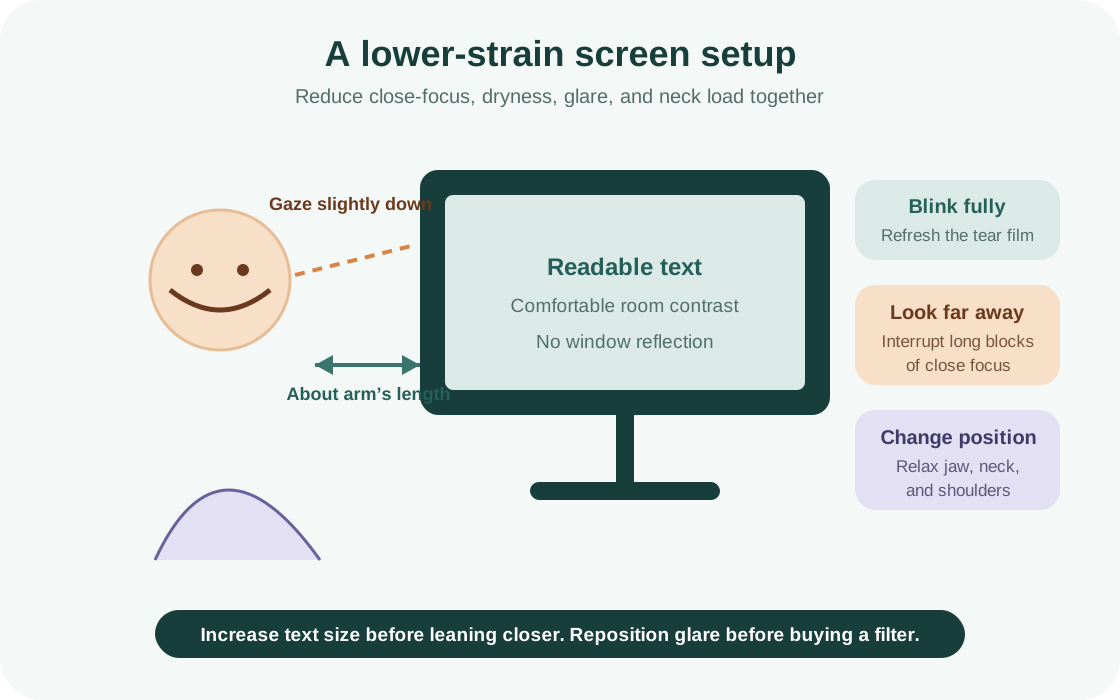
Use this checklist:
- Place the display roughly an arm’s length away, then adjust for comfortable text size.
- Keep the top of the main screen around eye level or slightly below so the gaze angles gently downward.
- Center the primary display rather than twisting the neck for hours.
- Increase text size before leaning closer.
- Position windows and strong lights to the side to reduce reflections.
- Match screen brightness to the room; avoid a glowing screen in a very dark space.
- Keep frequently read documents near the display to reduce repeated head turning.
- Use a separate keyboard or stand for long laptop sessions when possible.
- Let air vents or fans blow away from the face.
- Alternate screen work with meetings, walking, paper tasks, or distance viewing when the job allows.
Ergonomics should make the task easier, not enforce one rigid “perfect posture.” Change position regularly.
Dry eyes, contact lenses, and screen work
Dryness can blur vision and make the eyes feel tired or painful. Contact lenses may become less comfortable during long screen sessions because reduced blinking affects the tear film.
Useful observations include how long lenses had been worn, air flow, whether symptoms improved after removing lenses according to your normal routine, and whether dryness occurs away from screens. Do not use redness-relief or lubricating drops indefinitely without knowing what they contain; an optometrist, ophthalmologist, or pharmacist can help choose an appropriate product.
Eye pain, marked redness, light sensitivity, discharge, injury, or vision change while wearing contact lenses needs prompt eye-care advice because infection and corneal problems can become serious.
Do blue-light glasses prevent eye strain headaches?
Current evidence does not show a meaningful short-term advantage of blue-light-filtering lenses over ordinary lenses for reducing computer-related eye strain in the general adult population. A Cochrane review found that the evidence did not support strong claims for visual performance, eye-strain relief, sleep, or macular protection.
That does not mean display settings never affect comfort. Glare, brightness contrast, flicker, text size, viewing distance, and prolonged focus can matter. Night modes may feel more comfortable and reducing bright light before bed may support a sleep routine, but expensive “blue light protection” is not a substitute for breaks, corrected vision, dryness management, and a workable setup.
Can screens damage your eyes?
Ordinary digital-device use is strongly associated with temporary discomfort, dryness, and visual fatigue, but the low blue-light exposure from normal screens has not been shown to cause the retinal damage implied by many product advertisements.
Children and adults still benefit from breaks, outdoor time, suitable working distance, and regular eye care. In children, prolonged near work and limited outdoor time are relevant to myopia development and progression, which is a separate issue from a temporary eye strain headache.
When an eye exam may help
Arrange an eye exam when:
- symptoms recur despite reasonable breaks and setup changes;
- vision is blurry at distance or near;
- you squint, close one eye, lose your place, or see double;
- headaches consistently follow reading or close work;
- glasses or contact lenses no longer feel effective or comfortable;
- one eye behaves differently from the other;
- a child avoids reading, rubs their eyes, or reports recurring headaches; or
- it has been a long time since vision was checked.
An exam can assess refractive error, dry eye, focusing, alignment, eye health, and whether the symptoms need another type of medical evaluation.
Track the task, vision, and headache separately
Use a simple four-part entry:
Task: [device or close work], [start/end], [breaks]
Eyes/vision: [dryness, burning, watering, blur, double vision, refocusing]
Head/body: [pain location and quality, nausea, light sensitivity, neck/shoulder symptoms]
After stopping: [what improved, how quickly, what remained]
Also record counterexamples: the same task without symptoms, and a similar headache on a day without prolonged screen use. That makes the record more useful than total screen time alone.
When to seek urgent medical care
Seek urgent eye or emergency care for:
- sudden vision loss or a new curtain/shadow across vision;
- severe eye pain, especially with redness, nausea, or halos around lights;
- new persistent double vision;
- chemical exposure or a penetrating eye injury;
- new flashes or a sudden shower of floaters;
- a sudden extremely severe headache;
- weakness, numbness, confusion, fainting, seizure, or trouble speaking;
- fever with stiff neck or a rapidly worsening headache; or
- headache or vision symptoms after significant head injury.
Do not wait for a screen break to fix these symptoms. A familiar workday context does not rule out an urgent eye or neurological problem.
Frequently asked questions
How long does an eye strain headache last?
Mild eye strain often improves after stopping the visual task and resting the eyes, but there is no universal duration. Persistent, severe, or frequently recurring pain needs assessment.
Where does an eye strain headache hurt?
It may be felt around or behind the eyes, across the forehead, or in the temples. Location alone cannot distinguish eye strain from migraine or another headache.
Can phone use cause an eye strain headache?
Yes, prolonged close phone viewing may contribute through sustained focus, reduced blinking, small text, glare, and neck posture. The phone itself does not prove the diagnosis.
Can eye strain cause nausea?
Eye strain may cause visual discomfort or dizziness, but prominent nausea is more typical of migraine or another problem. Severe nausea with eye pain, redness, or halos needs urgent assessment.
Should I turn screen brightness all the way down?
Not necessarily. A very dim screen in a bright room can also be hard to see. Aim for comfortable contrast with the surrounding light and reduce reflections.
Do I need special computer glasses?
Some people benefit from an appropriate prescription for their working distance, but blue-light filtering alone has not shown reliable eye-strain benefit. An eye-care professional can determine whether a prescription or focusing issue is present.
Make the visual task easier, then check what remains
An eye strain headache often improves when close focus, dryness, glare, and posture are addressed. The useful first steps are simple: take a real visual break, blink, move, correct the setup, and arrange an eye exam when symptoms persist.
Calmraine can record screen use as a possible factor while keeping eye, vision, migraine, pain, and neck symptoms separate. That helps you bring a clearer pattern to an eye-care or healthcare professional without assuming the screen caused every headache.
Sources
- Eyestrain—Symptoms and causesMayo Clinic · Accessed
- Digital Eye Strain—A Comprehensive ReviewOphthalmology and Therapy / PubMed Central · Accessed
- Digital eye strain: prevalence, measurement and ameliorationBMJ Open Ophthalmology / PubMed Central · Accessed
- Computer Vision Syndrome (Digital Eye Strain)American Academy of Ophthalmology EyeWiki · Accessed
- Blue-light filtering spectacle lenses for visual performance, sleep, and macular health in adultsCochrane Database of Systematic Reviews / PubMed Central · Accessed
- Headaches in over 12s: diagnosis and managementNICE · Accessed